
Remove duplicates
Finds the same person even when the details are spread across rows: two rows that share an email or a phone number are treated as one. The first row is kept, and the count of removed rows is shown.
For CSV and TXT contact lists · Windows
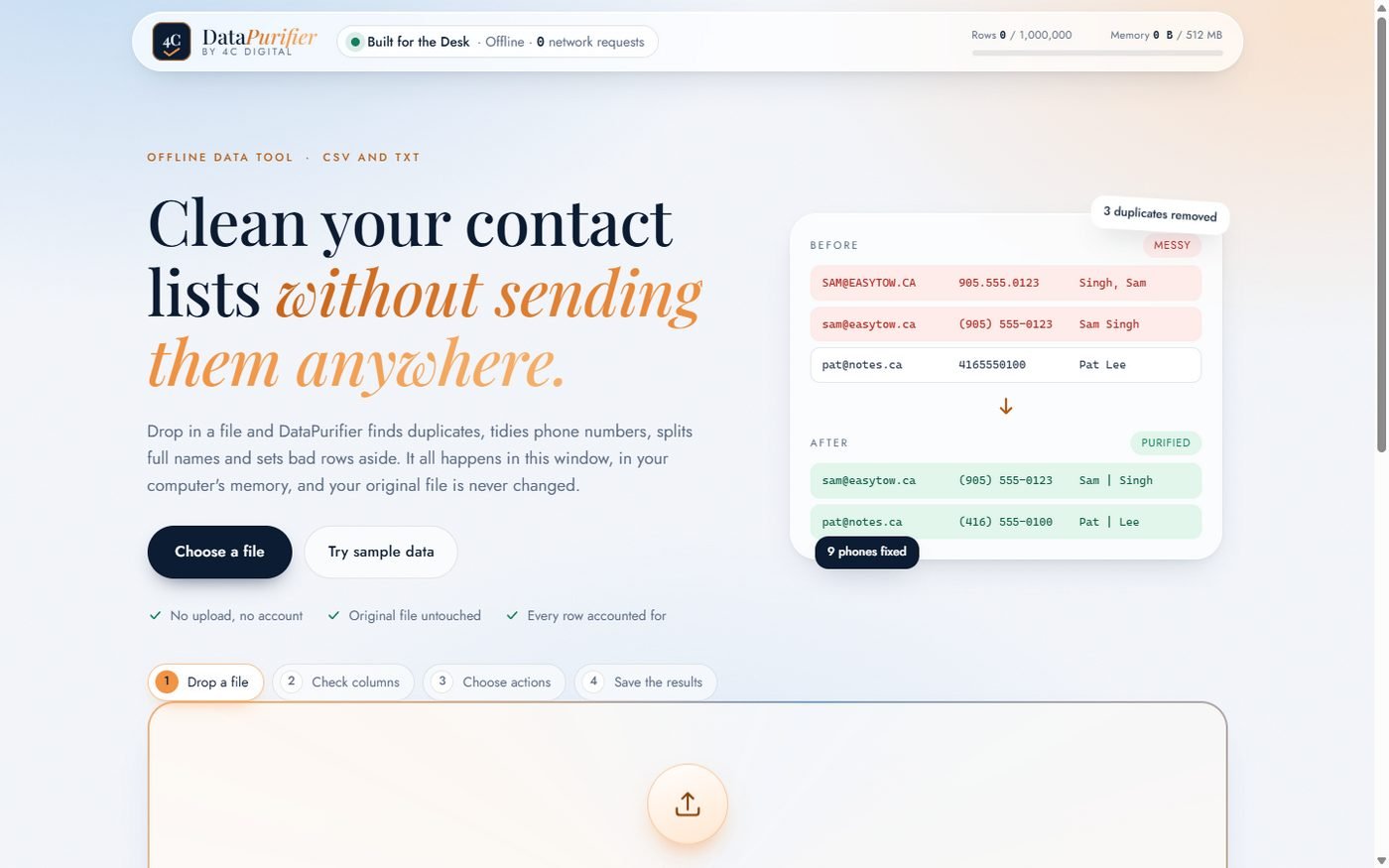
Drop in a file and DataPurifier finds duplicates, tidies phone numbers, splits full names and sets bad rows aside. It all happens on your computer, and your original file is never changed. Every row ends up in exactly one of two files: clean, or set aside with the reason.
How it works
DataPurifier reads your list into the computer's memory, shows you what it found, and only changes anything when you press Purify. Then you save the results wherever you like.
A CSV or TXT list (comma, semicolon, tab or pipe separated). It finds the columns for name, email and phone by itself, and you can correct it.
Counts of duplicates, messy phone numbers, names to split and corrupt rows appear straight away, before anything is touched.
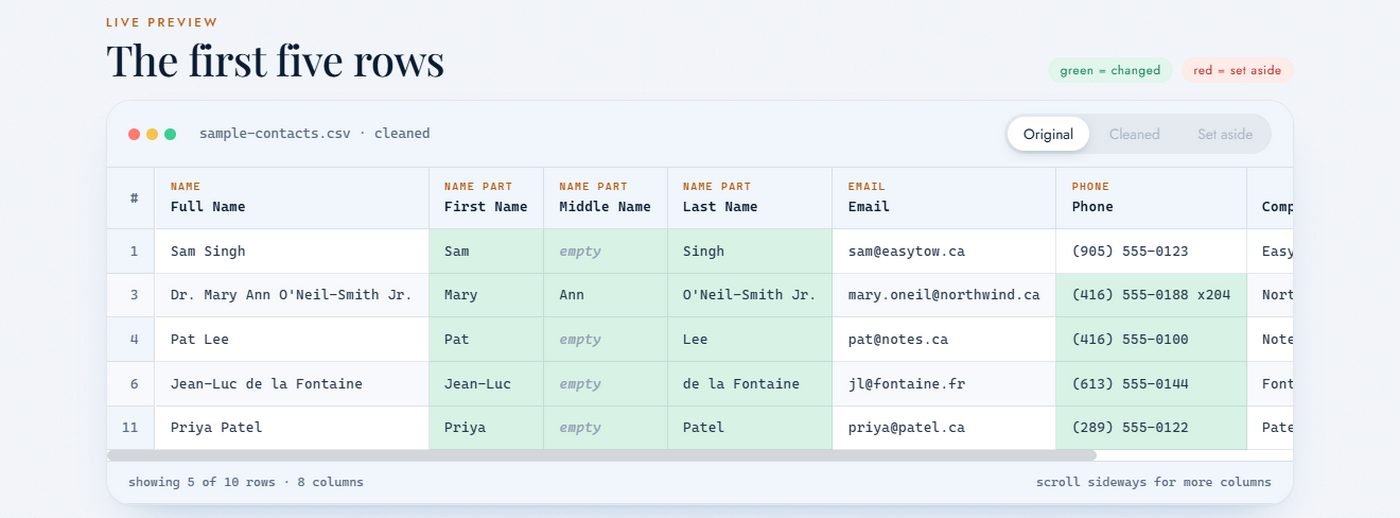
Turn each of the four clean-ups on or off and look at the live preview of the first rows.
Save the clean list and the set-aside list as Excel-friendly CSV files. The original stays exactly as it was.
What it does
Finds the same person even when the details are spread across rows: two rows that share an email or a phone number are treated as one. The first row is kept, and the count of removed rows is shown.
Turns 905.555.0123, 9055550123 and 1-905-555-0123 into (905) 555-0123, keeps extensions such as x204, and flags numbers that cannot be right instead of guessing. North American numbers.
Separates "Sam Singh", "Singh, Sam" and "Dr. Mary Ann O'Neil-Smith Jr." into first, middle and last name, keeping prefixes, suffixes and names like "de la Fontaine" together.
Rows with no usable email or phone, broken quoting or the wrong number of columns go to their own file with the reason next to each one, so you can fix them by hand.
Rows in equals clean rows out plus set-aside rows. Nothing is dropped silently, and the summary tells you the numbers.
No account, no cloud, nothing uploaded. The program does not connect to the internet at all, and it shows a live counter of network requests so you can see for yourself: it stays at zero.
Who it's for
Tidy a customer list before a mailing, a text campaign or an import into your accounting or CRM program.
Clean a client's export without emailing their customer data to an online service.
Merge member lists from several sources into one clean list, and see exactly what was set aside and why.
Pricing
Try everything free for 30 days. If it earns its place on your desk, buy a licence for that computer.
CA$49 + tax, once
Choose your location to see your exact total.
Optional. We use these details for your tax invoice and to email your licence key.
Your Computer ID:
Install the trial and click the Trial / Licensed label at the top right of the window to copy it.
Secure payment by Square. Your licence key works on one computer. Questions? admin@4cdigital.com
Questions
CSV and TXT lists separated by commas, semicolons, tabs or pipes, with or without a header row. For an Excel file, use Save As, CSV first. The saved files open straight into Excel with accents intact.
Never. It reads the file into memory and only saves new files where you tell it to.
Rows are the same person when they share an email address (ignoring capitals and spaces) or the same phone number after tidying. If A shares an email with B and B shares a phone with C, all three are treated as one. The first row is kept.
You can still open files and see what DataPurifier would do. Purifying and saving are switched off until you activate a licence.
Nothing is uploaded and there is no cloud and no account. The program does not connect to the internet: every network request is blocked, and the window shows a counter that stays at zero. Your lists exist only in the computer's memory while the program is open.
No. Cleaning, saving and activating a licence all happen on your computer. The internet is only needed to buy and to download the installer.
A key works on the one computer it was made for. If you replace your computer or reinstall Windows, send us the new Computer ID and we will issue a replacement key.
The installer is not yet code-signed, so Windows SmartScreen may show a notice the first time. Choose "More info", then "Run anyway". You can check the file first: its SHA-256 is 55509E8F679F285EB9FF6117C1FEC7874D609EF48B52BC57BEA3C94EBAD4F725.
It is Windows software (10 and 11, 64-bit); there is no Mac version. Phone tidying is for North American numbers; others are kept as typed and flagged. Name splitting follows common English and French patterns and cannot be perfect for every name, so look at the preview. The licence check works offline and is meant to keep honest users honest.
Try it on your own list
It takes about a minute to install, and there is sample data built in if you want a look first. If you have questions, write to us and a person will reply.